


GPS Navigation, Map Directions
3.8912.00 Reviews
App Specs
- Version
- 3.78
- Updated On
- License
- Free
- Downloads
- 10,000,000+
- Developer
- ShamiTech Apps
- Categories
- Maps & Navigation
- Platform
- Android
Screenshots
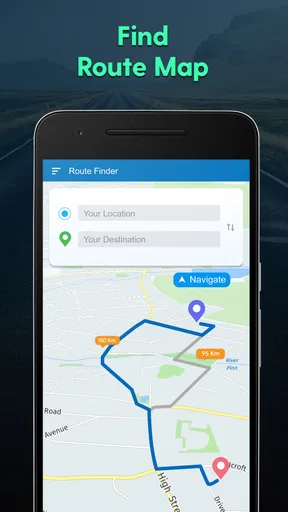
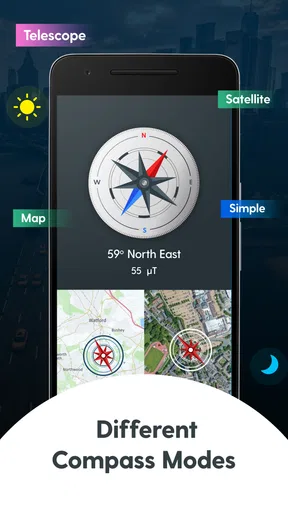
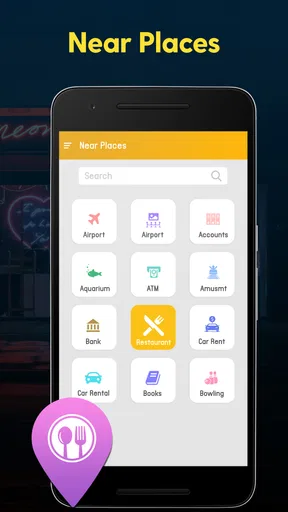
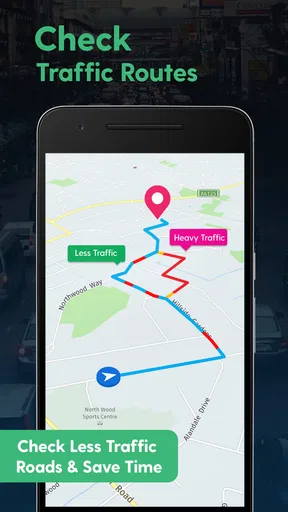
 Analysis by AppCompare
I tend to judge a navigation app by what happens when a trip stops being straightforward: the signal dips, a turn comes up quickly, or I need to find somewhere useful without pulling over to search elsewhere. GPS Navigation, Map Directions is a free maps and navigation app from ShamiTech Apps, and its mix of route-finding, nearby places and weather information is aimed at everyday journeys as much as unfamiliar drives. Its 3.9 average from around 17,000 ratings suggests a mixed but substantial audience; I’d treat it as an option to try, not a guarantee that it will suit every route or phone.
When the network is part of the journey
Navigation feels effortless when the map, location and route information are all ready at the moment I need them. It feels less dependable when reception is patchy or mobile data is unavailable. That distinction matters with this app: I’d plan a trip on a stable connection, check the route before setting off, and avoid assuming that any map or guidance will remain available after the connection drops. A route that looks clear at home still deserves a quick check once I’m on the road.
On a familiar commute, I can use route guidance as a prompt rather than follow it blindly. On an unfamiliar drive, I’d give myself more time to review the destination and major turns before leaving. That small habit helps if the map takes a moment to refresh or a late change in traffic makes the suggested path less useful. The app is best treated as a helpful navigator, not a replacement for paying attention to signs and the road.
Getting Started with GPS Navigation, Map Directions
First off, let's talk about getting set up. You can find the app on both Android and iOS, which is pretty neat. After downloading and installing, I was greeted with a super user-friendly interface. The home screen is clean, with intuitive icons that make navigation a breeze. No need for a tech degree here!
Once you're in, the app requests access to your location (obviously) and then you're good to go. I loved how the app instantly found my location and offered suggestions for nearby points of interest. Whether you're looking for the nearest coffee shop or the best pizza in town, this app has got you covered.
Choosing the right moment to use it
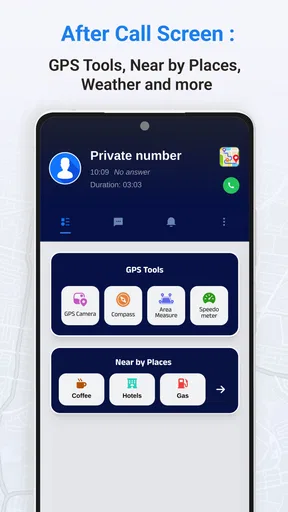
The nearby-place search is most useful when I have a clear practical need, not when I’m browsing at random. If I’m meeting someone in an unfamiliar part of town, for example, I can look for a suitable place nearby before I start driving, then choose the destination while I’m still parked. That is safer and less distracting than making decisions at a junction. For a planned stop, I’d also confirm the exact business name and address, since a broad search can return places that are close geographically but not convenient for the route.
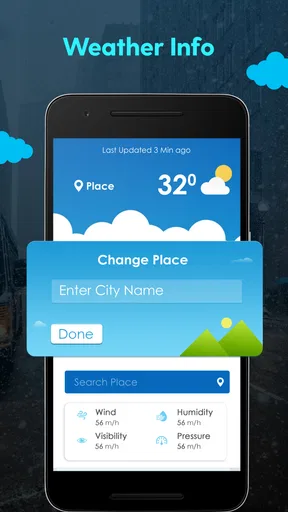
The weather update can add useful context when deciding whether to leave now or allow extra time, but I wouldn’t treat it as a substitute for checking conditions along a longer journey. A local update does not necessarily describe the weather at the far end of a drive. My practical approach is to use it as a quick prompt, then make a separate check if weather could affect the trip.
Worth Reading Before You Choose

Flipboard Shows What News Apps Must Do Beyond the Feed

Switching to Android Auto Means Rethinking Your Driving Routine

Google Calendar Makes a Crowded Week Easier to Manage

Ludo King Makes the Most of the Minutes Between Plans

Baby Panda World Brings Quick Play to Modern Phones, but Its Game Library Feels Busy

ESPN’s Live Game View Makes Following Close Games Easier
GPS Navigation, Map Directions is available at no charge, is rated for Everyone, and has passed five million installs. It was released on August 18, 2018, and version 3.70 supports devices running Android 7.0 or later. Those details make it accessible to many Android users, though they don’t tell me how well it will behave on a particular device or in every region. In-app purchases are listed at $2.49 per item, so I’d check what an optional purchase covers before paying rather than assume every useful feature is included for free.
Features That Stand Out
Now, let’s dive into the features because there are a ton, and some of them are absolute game-changers. For starters, the real-time traffic updates are a lifesaver. The app provides live traffic information, helping you avoid those dreaded bottlenecks. This feature alone can turn a frustrating commute into a smooth ride.
Another feature that I found particularly handy is the voice-guided navigation. It's like having a co-pilot who never gets tired or needs bathroom breaks. The directions are clear, and the voice is pleasant enough not to get on your nerves during long trips.
The offline maps feature is another highlight. You can download maps for entire regions, which is perfect if you’re going off the grid or traveling abroad without a reliable data connection. No more stressing about losing signal in the middle of nowhere!
The app also boasts a lane guidance feature, which is a godsend in multi-lane highways. It clearly indicates which lane you should be in, so you won't miss any critical exits.
Traffic, voice prompts and attention
Traffic information is valuable only when it is current enough to change a decision. If a faster-looking route sends me through unfamiliar side streets, I’d weigh the time saving against extra turns, awkward intersections and the possibility that the alternative is simply harder to follow. In dense traffic, I prefer a route I can understand at a glance over one that looks clever but demands constant attention. A navigation suggestion should help me make a safe choice, not pressure me to chase every minute.
Voice guidance is especially helpful when I’m driving alone, because it lets me keep my eyes on the road instead of checking the screen for each instruction. I’d set the volume and route before moving, and keep the phone mounted where it is easy to glance at without obstructing my view. If the spoken instruction arrives too late for a safe manoeuvre, I would continue safely and let the route adjust rather than cut across lanes. Lane guidance can be useful on a multilane road, but it does not remove the need to read road signs or anticipate exits.
Exploring the User Experience
In terms of user experience, GPS Navigation, Map Directions is top-notch. I was particularly impressed by the speed of the app. It loads quickly, and recalculating routes is almost instantaneous, even in a densely populated urban area.
The app’s design is sleek and modern. I appreciate the attention to detail, like the contrasting colors that make everything visible even under bright sunlight. The map view is customizable, offering options like satellite view or terrain mode, which can be useful depending on your needs.
But it’s not just about looks; the app's functionality is where it truly shines. The search function is robust, recognizing addresses, landmarks, and even business names. You can also save your favorite locations, making it easy to plan your next adventure.
Small habits that make a trip smoother
Saving regular destinations is a simple way to reduce fiddly searches when I’m in a hurry. I’d use that for places I visit repeatedly, such as work or a family address, and still check the selected destination before starting a route. A saved location is convenient, but it can become stale if the place or meeting point changes. For a one-off appointment, searching the full address is safer than relying on a remembered label.
For an unfamiliar town, I’d choose the destination and inspect the general route while stationary, then use voice prompts during the drive. If I’m going somewhere with limited parking or a confusing entrance, I’d also look at the final approach before leaving, so I’m not trying to interpret the map at the last turn. Satellite or terrain views may help me understand surroundings, but I’d switch back to the clearest view for driving if extra map detail makes the screen harder to read.
Connectivity can also affect how much I rely on live traffic and nearby-place results. If the connection is unreliable, I’d avoid making a last-minute detour based on information that may not refresh promptly. Keeping the intended destination in mind and allowing a little extra time is a better fallback than assuming the app will always find a new route instantly.
Where it fits among navigation choices
Compared with the map apps people commonly use for turn-by-turn driving, this one brings route directions together with nearby-place discovery and weather updates. That combination can be convenient when I want one place to check a route and find a stop. A dedicated navigation app may be a better fit for someone who depends on a particular ecosystem, detailed journey planning or a well-established set of saved places. I’d compare the actual route suggestions in my area before making this my only navigation tool, because road coverage and traffic usefulness can vary from one place to another.
It is a reasonable choice for casual drivers, visitors who need straightforward directions, and people who often look for a nearby stop while travelling. I would be more cautious recommending it as the sole tool for remote journeys, time-critical trips or routes where a weak connection could leave me without timely updates. In those situations, I’d prepare a backup plan and use a navigation option whose offline behaviour I have personally tested, rather than assuming this app will continue to guide me without service.
Handling a hiccup without losing focus
If the location marker seems slow or the route does not match what I see around me, my first response would be to stay on a safe, legal path and avoid making a sudden turn. I’d check whether the phone has a usable connection and whether location access is available, then wait until I’m stopped somewhere safe before adjusting the destination or restarting the route. That order matters: troubleshooting while moving creates more risk than taking a brief, sensible pause.
For a trip that matters, I’d enter the destination before setting off, make sure the phone has enough charge for the journey, and keep the address somewhere I can refer to if the app becomes unavailable. Those are ordinary precautions, but they make a real difference when navigation is being used on a phone rather than a dedicated in-car unit. I would not count on a route recalculation being instantaneous every time, even if it has felt quick on other journeys.
Data-conscious use is mostly about avoiding unnecessary searching while travelling. I’d decide on likely stops before departure when I can, use the nearby search when it answers a specific need, and avoid repeatedly changing routes just to compare alternatives. If mobile data is limited, I’d pay particular attention to whether live information is essential for that trip and keep my expectations modest when the connection is poor. I’d also review optional in-app purchases before buying; a listed price does not by itself explain which item is worthwhile for my routine.
Final Thoughts
After spending some quality time with the app, I can confidently say that GPS Navigation, Map Directions is a must-have for anyone who values their time and sanity on the road. Whether you're commuting daily or exploring a new city, this app has the tools to make your journey smoother and more enjoyable.
So, if you're tired of getting lost or stuck in traffic, give this app a shot. It might just become your go-to travel companion. Safe travels!
My connectivity verdict
I’d try it for ordinary trips where route guidance, traffic context and a quick search for nearby places are useful together. The strongest case is convenience: set the destination, listen for turns, and use local search when a practical stop comes up. The main trade-off is that live navigation is only as useful as the phone’s location and connection at the time, so I would not build a remote or high-stakes journey around an assumption of uninterrupted service.
For me, this app is worth considering as a day-to-day option, especially if its routes make sense in the places I travel. I’d keep my attention on the road, confirm important destinations before moving, and test it on a familiar journey before trusting it somewhere new. That is a realistic way to find out whether its mix of maps, directions and nearby information works for my own routine.
Pros
- User-friendly interface for seamless navigation.
- Accurate real-time traffic updates.
- Offline maps save data and battery.
- Voice-guided directions enhance safety.
- Customizable routes for personal preferences.
Cons
- High battery consumption during long trips.
- Occasional map loading delays.
- Ads can be intrusive in free version.
- Limited features without a premium subscription.
- Requires regular updates for accuracy.
FAQs for GPS Navigation, Map Directions
What features does the GPS Navigation, Map Directions app offer?
The GPS Navigation, Map Directions app provides real-time traffic updates, turn-by-turn navigation, offline maps, and customizable routes. It also includes points of interest, speed limit warnings, and voice-guided directions. The app is designed to offer comprehensive navigation solutions whether you're walking, driving, or biking.
Is the GPS Navigation, Map Directions app available offline?
Yes, the app offers offline maps, allowing you to download maps for specific regions or countries. This feature is particularly useful when traveling in areas with limited internet access. Users can pre-download maps to ensure uninterrupted navigation even without a data connection.
How accurate are the maps and navigation directions provided by the app?
The GPS Navigation, Map Directions app uses advanced algorithms and regularly updated map data to ensure high accuracy. Users report reliable turn-by-turn directions and minimal deviations. Real-time traffic updates further enhance accuracy by suggesting alternative routes to avoid congestion.
Does the app support multi-stop routes and route customization?
Yes, the app supports multi-stop route planning, allowing users to add multiple destinations along a journey. It also offers route customization, giving users the ability to prioritize highways, avoid tolls, or choose the fastest or shortest routes. This flexibility makes it suitable for complex itineraries.
Is the app free, or does it require a subscription?
The GPS Navigation, Map Directions app offers a free version with basic features. However, for advanced functionalities like ad-free usage, premium map updates, and enhanced traffic data, a subscription may be required. Users can choose between monthly or annual plans based on their navigation needs.


